Verdue for contractors

Run the day.
Keep the record.

Give your crews a clear plan, keep the visit details together and turn completed work into a record your clients can follow.

14 days free. No card needed.
Plans from $29/month AUD + GST. View pricing
For vegetation maintenance and grounds teams.

VerdueWorkspace / Coastal northCN
OPERATIONS OVERVIEW

Your day, in view.

Example workspace
Sites in view02
Planned tasks03
Assigned crews02
12Coastal north2 sites Journey history
01Lillypilly ReserveMowing + snipping · Crew APlanned
02Grevillea ParkGrounds maintenance · Crew BCarry-over
The details stay with the job.Site. Work. Photos. Notes.
Illustrative interface · Fictional sites and records
Recurring visitsCrew coordinationClient reporting

The problems Verdue helps you solve

Less chasing.
More clarity.

Scattered plans. Missing photos. Another call to find out what happened. Connect the office and field with tools built around the work, the site and its record.

Illustrative product views · Fictional examples

Work management

Give every crew a clear plan.

When the day is spread across spreadsheets and calls.

Bring recurring visits, tasks and crew assignments together. See what is planned and keep unfinished work in the conversation.

Explore work management

Auto assignments

Spend less time building the next run.

When allocating work becomes a job of its own.

Create a proposal from due work and available capacity. Review the suggested assignments before applying them.

Explore the planning tools

Site data

Find the whole story of a site.

When site knowledge lives in different places.

Keep mapped boundaries, work history, photos and access notes connected. Find the site, then see the detail that belongs to it.

Explore the site workspace

Photos & notes

Keep field details out of the group chat.

When photos and notes lose their context.

Capture the scene and explain what happened. Keep photos, conditions and visit notes with the site and work record.

Explore field records

Journey history

Retrace the day without the guesswork.

When you need to understand a journey.

Replay recorded movement, revisit a moment and see the nearby sites. Location provides context; the work record tells you what was done.

Try the tracking example

Unfinished work

Make the next follow-up clear.

When unfinished work slips out of view.

Keep carry-over and site notes visible, so wet ground, access issues and another visit stay part of the plan.

See notes and exceptions

Reporting & evidence

Show the work. Keep the gaps visible.

When reporting means piecing the story together.

Bring the visit and supporting evidence into a report. Distinguish verified records from partial evidence, so missing details remain clear.

See the report example

A day in motion

The journey matters.
Replay the detail.

Bring movement back into view. Explore a contractor tracking example, from the first recorded position to the end of the journey.

VerdueTracking HistoryInteractive example
Demo operator
Morning journey
12
History replay 07:00
Recorded route
07:00 · Start07:24 · Finish

Illustrative interface · Fictional map, operator and journey. Location history does not verify completed work.

The office, connected to the field

A plan for the crew.
A place for every detail.

Work management, automatic assignment proposals and a shared site register. Bring the next job and the bigger picture into the same working day.

Work management

Give every job a place.

Keep upcoming work, assigned crews and outstanding tasks together. See what is due and what still needs attention before the day begins.

  • Recurring visits and outstanding work
  • Assignments linked to a site and crew
  • Recorded progress available for review
Verdue / Work managementInteractive example

Today’s plan

A clear starting point.

Coastal north · Today
03 Planned tasks02 Assigned crews01 Carry-over
Site / workAssigned toStatus
Lillypilly ReserveMowing
Crew APlanned
Lillypilly ReserveSnipping
Crew APlanned
Grevillea ParkGrounds maintenance
Crew BCarry-over

Keep unfinished work visible.
Carry-over remains part of the next planning conversation.

Illustrative interface · Fictional sites, crews and records. This example does not change real work.

IN THE FIELD01 / Capture the detail
Verdue / Field

Current site

Lillypilly Reserve

Mowing · Scheduled work

LP-01 · Coastal north
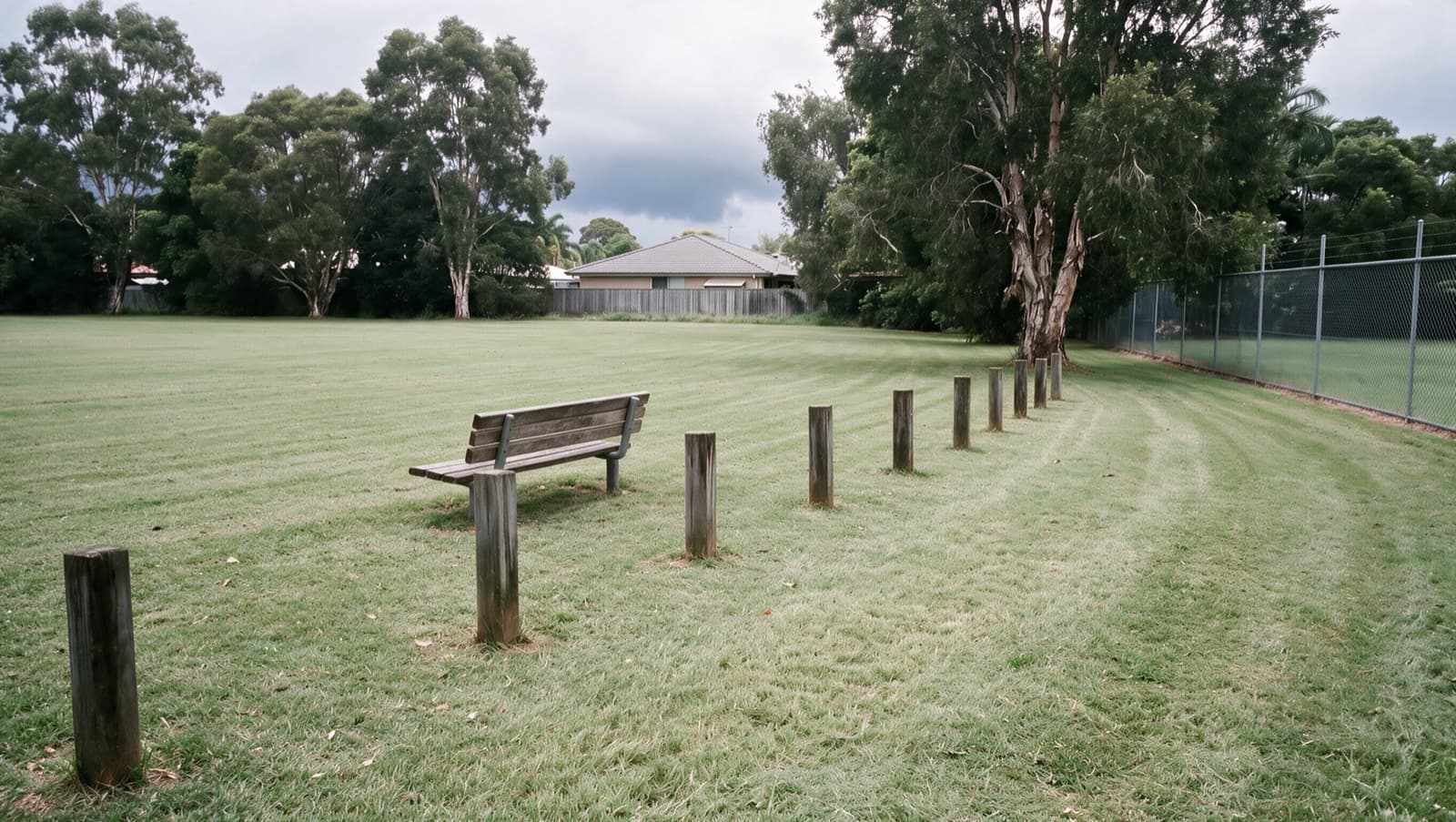
Example grounds-maintenance photo showing mown grass, trees and a fenceExample photo
A photo with its context.

Connected to the site and work record.

Grounds photoIllustrative attachment

Illustrative app screen · Fictional record

The record starts on the ground

Capture it there.
Find it here.

A photo in the camera roll loses its context. A note in a message gets buried. Keep the useful details with the site and work, ready for the office to review.

Back in the office
Open the site’s history to review its work records, photos and notes together.

Actual software output

Show what happened.
Include what's missing.

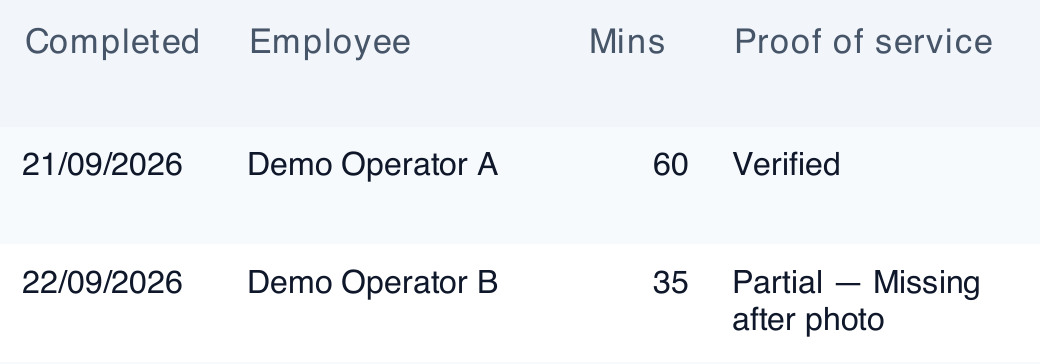
This excerpt comes from a software-generated report using fictional demonstration records. One entry is verified; another is partial because the after photo is missing.

The distinction matters when you're explaining the work to a client.

Explore the software report

See the full report in a tailored demonstration.

Software-generated report excerpt
Software report: Demo Operator A, 21 September 2026, 60 minutes, verified. Demo Operator B, 22 September 2026, 35 minutes, partial because an after photo is missing.

Excerpt transcription

Demo Operator A

21 September 2026 · 60 minutes

Verified
Demo Operator B

22 September 2026 · 35 minutes

Partial — Missing after photo
Actual software output · Fictional demonstration records · Cropped public excerpt

Verified and partial stay distinct.
Missing after-photo evidence remains visible.

Choose the support
that fits your team.

Use the software yourself, or discuss extra help keeping the operation organised.

SELF-MANAGED SOFTWARE

Your crew.
Your day-to-day system.

Set up your sites, run a visit and follow its record through to reporting.

Start free trial

REMOTE OPS

Software, with
human support.

Discuss setup help and weekly human review. Remote Ops is a separate service with its own delivery scope.

Talk about Remote Ops

Start with one site

See your next visit
through to the report.

Try the contractor workflow with your team.